
Clearer Kubernetes Evidence and Safer Deployment Workflows
improvedKubernetes Optimizer gains clearer utilization evidence, inventory refreshes handle concurrent requests more reliably, and cluster Settings connect your GitHub repository alongside observability. Deployment credentials survive more recent deployment history, while the CLI uploads a build to every connected registry for the project.
Automate Optimization for Each Workload
Building on scheduled workload optimization, you can give each Deployment or StatefulSet its own recurring analysis schedule. Analyze a Deployment daily, check a StatefulSet every six hours, or disable optimization for workloads that need to stay fixed.
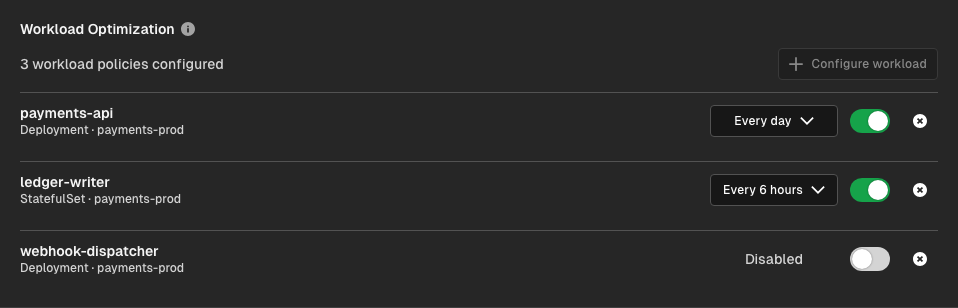
Start an eligible workload analysis with Optimize now, or ask Agent from chat. Policies stay visible even when a workload is absent from the latest inventory, so you can repair or remove stale configuration without finding the resource first. Hyphen prevents overlapping optimization runs and keeps recommendations scoped to the exact cluster, namespace, and workload.
Inventory refreshes now reuse an in-progress collection when several requests arrive together. You can refresh while another collection is running without turning the overlap into a failed request. Read how analysis and approvals work in Kubernetes Optimizer.
Automatic Observability Connections for Kubernetes Clusters
Horizon discovers the cluster's telemetry source. When Hyphen finds one unambiguous matching provider integration, it validates the cluster and creates the observability connection automatically. You do not need to enter a cluster identifier manually.
Agent combines Kubernetes inventory with telemetry from the connected source:
- New Relic — Kubernetes metrics and logs from the New Relic Kubernetes integration.
- AWS — CloudWatch Container Insights metrics and CloudWatch Logs, connected through the AWS integration using the EKS cluster ARN.
- Azure — Azure Monitor managed Prometheus metrics and
ContainerLogV2logs, connected through the Azure integration using the AKS resource ID. - Google Cloud — Cloud Monitoring metrics and Cloud Logging, connected through the Google Cloud integration using the full GKE resource name.
For manual setup, open the registered cluster's Settings, find Observability, and select Setup connection. Choose the integration receiving the cluster telemetry and enter its provider-specific cluster identifier. See Kubernetes Observability for connection requirements.
Provider queries now collect metrics and logs independently through nfabric. If one query fails, usable evidence remains available and Agent reports the missing evidence instead of treating it as a healthy signal. Existing observability connections keep their configuration.
Cluster Settings also adds a Repository connection: create a GitHub repository or connect an existing one, then open it directly from the cluster. When comparing inventory snapshots, deleted workloads and pods stay grouped with their history without overlapping the live resources, making before-and-after checks easier to follow.
More Resilient Deployments and Provisioning
Deployment credential cleanup now retains the newest 200 active secrets for each exact deployment API key instead of immediately discarding all but one. This reduces credential churn across recent deployments and keeps cleanup from affecting similarly named keys.
See Deployment run methods for how GitHub, CLI, API, and dashboard deployments share the same run history.
Safer CLI Workflows and a Clearer Deployment Trail
The Hyphen CLI now uploads a locally built image to every registry connected to the project, reducing manual uploads across deployment targets. Upload progress identifies each registry, and a failed login or push names the affected destination.
The existing v0.29.0 safeguards remain in place: Hyphen creates an environment encryption key only after an explicit missing-key response, and deployment links open the exact environment run. Authentication or network errors do not trigger replacement keys. Agent-started deployments also link back to the Agent run, keeping the recommendation, approval, and execution connected.
Things to Know
- Approval stays with your team. Recurring policies automate analysis; Hyphen reviews proposed changes with you before modifying the workload.
- A disabled policy blocks scheduled and manual optimization. Removing the policy restores on-demand analysis without enabling a recurring schedule.
- Missing telemetry is not evidence of health. Agent identifies gaps and uses the inventory and provider data that remain available.
- Repository setup connects a repository to the cluster. It does not automatically deploy repository changes or synchronize manifests.
- Registry uploads are sequential. A failure stops the build; images already uploaded to earlier registries remain there.