
Scheduled Kubernetes Optimization and More Reliable Deployments
addedHyphen now makes Kubernetes optimization easier to automate, understand, and verify with workload-level Optimizer policies, clearer evidence and results, and more resilient deployment networking. Hyphen CLI v0.29.0 also adds safer environment key handling and links that take you directly to the correct deployment run.
Automate Optimization for Each Workload
Teams can now manage Kubernetes Optimizer policies for individual Deployments and StatefulSets. From a cluster's settings, you can:
- Run optimization on a recurring schedule that fits each workload.
- Disable optimization for workloads that need to stay fixed.
- Start an eligible workload analysis immediately with Optimize now.
- Keep policies visible when a workload is absent from the latest inventory, so stale configuration can be repaired or removed.
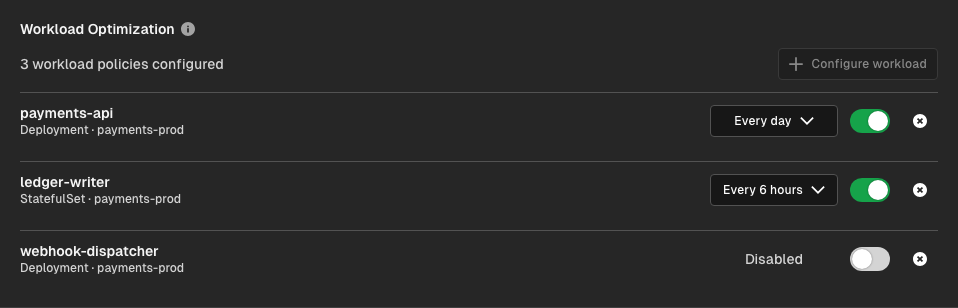
This gives platform teams a repeatable right-sizing rhythm without applying the same schedule to every workload in a cluster. Workloads without a policy remain available for on-demand analysis, while a disabled policy prevents both scheduled and manual runs.
Hyphen also prevents overlapping Optimizer runs for the same workload and scopes prior recommendations and outcomes to that exact workload. Agent can use the right history without mixing together similarly named resources from different clusters or namespaces.
Learn how Agent evaluates workloads and protects scale changes in Kubernetes Optimizer.
Understand and Verify Every Recommendation
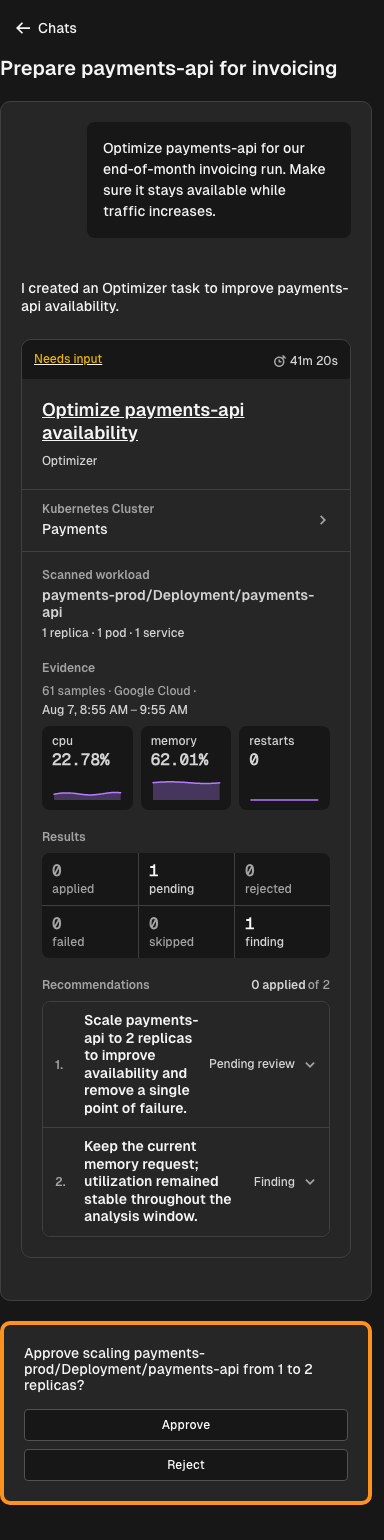
Optimizer runs make it easier to see why Agent reached a recommendation and what happened after you acted on it:
- CPU, memory, restart, and log evidence from the connected provider is organized around the analysis window, making recent workload behavior easier to review.
- Recommendations that Agent cannot safely apply include the rejection reason, so you know what needs attention instead of seeing an unexplained skip.
- Live run activity and newly arriving results make progress visible during longer analyses.
- After an approved change, Hyphen refreshes cluster inventory and waits for an applied snapshot, helping you verify the updated workload state in the same flow.
Horizon discovers the cluster's telemetry source automatically. When Hyphen finds one unambiguous matching provider integration, it can validate the cluster, create the observability connection, and make the data ready for Agent. You do not need to enter a cluster identifier manually.
Agent combines the inventory reported by Horizon with workload telemetry from the connected source:
- New Relic — Kubernetes metrics and logs from the New Relic Kubernetes integration.
- AWS — EKS workload metrics from CloudWatch Container Insights and application logs from CloudWatch Logs. The AWS integration identifies the cluster by its EKS cluster ARN.
- Azure — AKS metrics from Azure Monitor managed Prometheus and container
logs from
ContainerLogV2. The Azure integration identifies the cluster by its AKS resource ID. - Google Cloud — GKE metrics from Cloud Monitoring and workload logs from Cloud Logging. The Google Cloud integration identifies the cluster by its full GKE resource name.
If Hyphen cannot determine the source automatically, you can connect it manually. Open the registered cluster's Settings tab, find Observability, select Setup connection, choose the integration receiving that cluster's telemetry, and enter its provider-specific cluster identifier.
Learn more about managing the connection in Kubernetes Observability, or compare the before-and-after cluster state with Kubernetes inventory snapshots. Recommendations still require review and approval before Hyphen changes a workload.
More Resilient Deployments and Provisioning
Hyphen now uses a more resilient nfabric provisioning path to create and reconcile deployment networking. Routing configuration carries through to backend endpoints more consistently, and AWS load balancer listener rules, certificates, and path priorities are synchronized more reliably.
Preview hostnames also account for their DNS zone, including multi-label apex domains, while custom-domain updates better handle hostname changes and missing region data. Additional cloud provisioning retries give resources such as networks and load balancers time to become ready before a deployment is treated as failed.
Together, these changes reduce failed or partially configured deployments and make repeated deploys more likely to converge on the intended routing state across AWS, Azure, and Google Cloud. See how runs started from GitHub, the CLI, the API, or the dashboard fit into the same workflow in Deployment run methods.
Safer CLI Workflows and a Clearer Deployment Trail
Hyphen CLI v0.29.0 is available now. Deployment commands return links that open the exact project environment run, so you can move from terminal output to logs and status without searching in the dashboard.
The CLI also creates a new environment encryption key only when Hyphen explicitly reports that no key exists. Authentication failures, temporary service errors, and network failures are surfaced instead of being mistaken for a missing key. This protects the existing key from being orphaned and makes secret pull, push, and deployment workflows more reliable.
Deployments started by Agent also link the deployment run back to the Agent run that triggered it. That gives teams a clearer audit trail from the original recommendation and approval through deployment execution.
Things to Know
- Workload policies support Deployments and StatefulSets. Each workload can have its own schedule or be disabled independently.
- A disabled policy blocks manual and scheduled optimization. Removing the policy restores on-demand runs for that workload.
- Scale changes still require approval. Scheduling automates analysis, not permission to change your cluster.
- CLI v0.29.0 is available now. Run
hx updateto install the latest version.