
Reporting, Datadog and SigNoz Integrations, and Agent File Attachments
improvedGive your team a clearer record to review before it acts. Reporting saves identity, access, and device evidence for CMMC Level 2 preparation, so reviewers can work from the same observations. Reports collect evidence; they do not validate controls or determine compliance. Datadog and SigNoz bring more of your existing telemetry into Hyphen for application investigations. Alongside clearer log views and Agent file attachments, these changes reduce repeated searches and help your team choose its next step with more confidence.
Collect CMMC Evidence with Reporting
Spend less time on evidence preparation for CMMC Level 2 certification. Hyphen Reporting collects and saves identity, access, authentication, and device evidence from your connected systems. Your team can investigate access gaps, prepare for reviews, and answer assessor questions without repeated exports from each provider.
Reporting supports your CMMC Level 2 preparation, but it is not a compliance assessment or certification service. It does not validate controls, determine compliance, or guarantee certification. Your team validates control implementation. Your organization and assessor determine whether the evidence is sufficient for the assessment scope. Partial coverage and unknown values stay visible; they do not establish that a control works.
More integrations for evidence collection. Mosyle Business adds device inventory, while Okta adds identity evidence. Existing Microsoft Office 365, Azure, and Google Workspace integrations already support evidence collection. Your team can collect evidence from the systems it already uses.
Give reviewers answers they can trace. Use Microsoft Entra ID, Okta, or Google Workspace as the source of truth. Compare accounts and observed access across these directories and GitHub, or review a single source. Findings help you investigate access that remains after a source identity is disabled. MFA enrollment and available method details add authentication evidence to the same review.
Include device evidence. Entra ID reports show Intune devices and Entra device registrations. Mosyle Business reports provide a separate device inventory. These records help your team explain which devices the connected systems report and where inventory needs review.
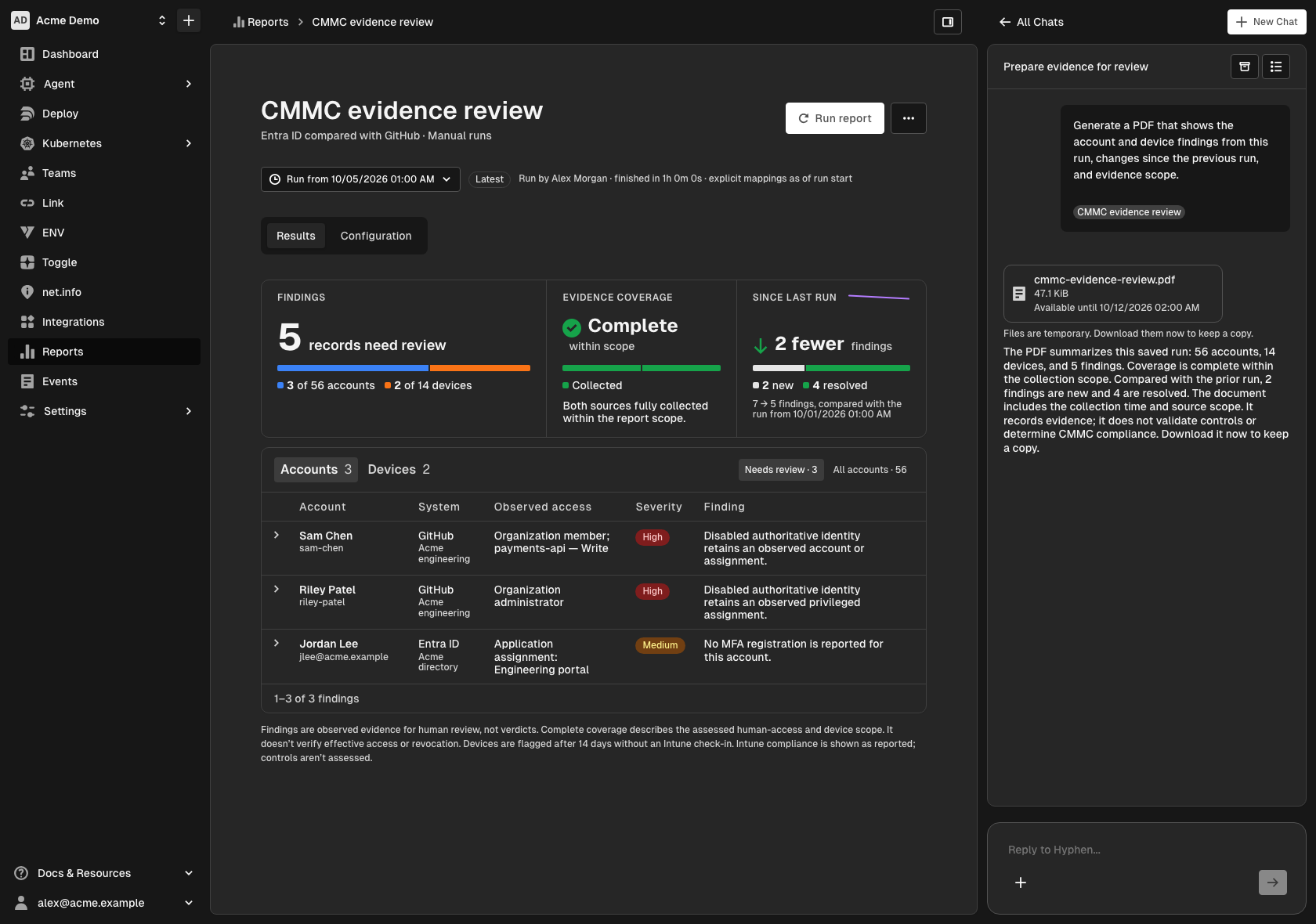
Return to the evidence behind a review. Each manual run saves its results and the configuration it uses. Compare findings between runs and inspect coverage gaps. Start a chat from the report page to ask the Agent about the selected run's saved evidence. This helps you answer follow-up questions without a fresh search through each provider.
The example below shows a saved run with complete evidence coverage within its scope. The Agent creates a PDF from the saved observations. Your team can keep that evidence for review. The PDF does not validate controls or determine CMMC compliance.
Datadog and SigNoz Integrations Expand Application Telemetry
Use the telemetry you already collect. Datadog and SigNoz integrations add application logs and Kubernetes observability. Hyphen's supported log sources include:
- Datadog — application and Kubernetes workload logs.
- SigNoz — application and Kubernetes workload logs.
- New Relic — application logs through APM connections.
- AWS CloudWatch Logs — container and Kubernetes workload logs.
- Google Cloud Logging — container and Kubernetes workload logs.
- Azure Monitor — Kubernetes workload logs.
Connect services by project environment to focus each investigation on the correct app. SigNoz setup supports cloud and publicly reachable self-hosted instances.
Datadog discovery reduces manual setup. Horizon must discover exactly one Datadog cluster name, and your organization must have exactly one Datadog integration. With observability discovery enabled, Hyphen validates the cluster and creates its observability connection automatically. You do not need to copy the cluster identifier into a second setup form.
Scan logs before you open the details. Application log rows show timestamps, severity, and readable messages. Expand structured JSON when you need the full record. This keeps the initial view easy to scan during an investigation.
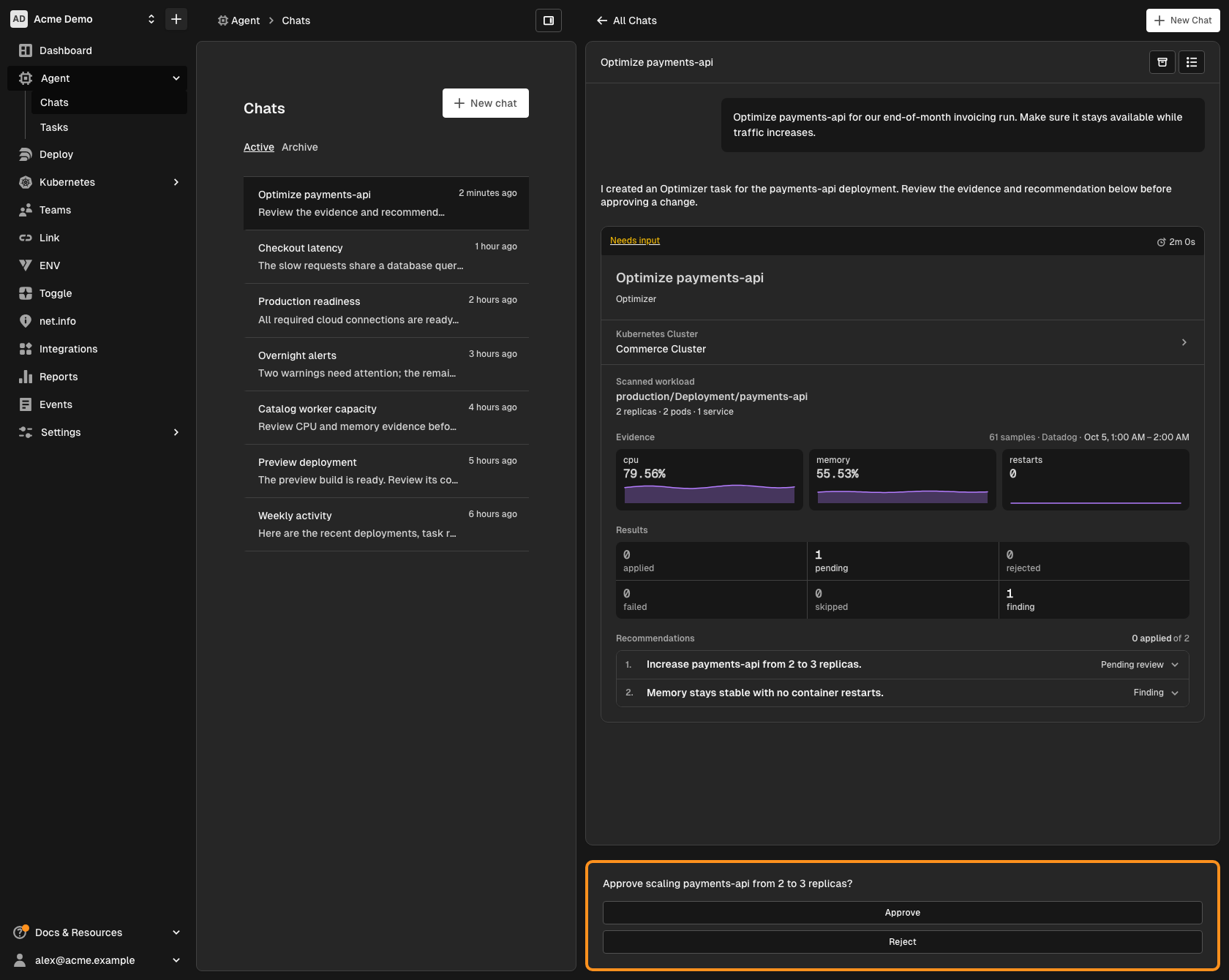
These sources feed the existing Kubernetes Optimizer review workflow. Compare CPU, memory, and restart evidence before you accept a recommendation; Approve and Reject keep the decision with your team. The example below shows how Datadog telemetry informs a workload recommendation.
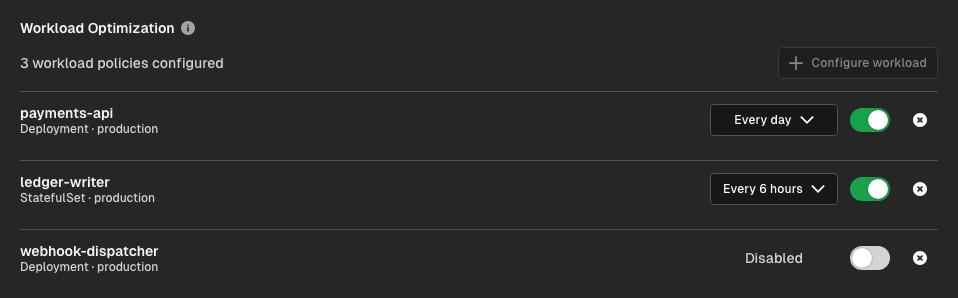
Your existing workload policies continue to control each Deployment or StatefulSet's analysis schedule. The example below shows daily, six-hour, and disabled policies. The earlier optimization entry covers these controls in detail.
Attach Files to Agent Chats
Attach documents, logs, or images to an Agent question. You do not need to copy their contents into chat. Image previews and upload status help you check the files before you send the message. Failed uploads have a retry action, so you can recover without a fresh copy of your question.
Keep CLI Commands Linked to the Right Project
CLI v0.30.1 uses an existing app's actual project when it creates the local configuration. If initialization finds an app that already exists, later commands retain that app's project context. This reduces the risk that a command targets the wrong project. See the Hyphen CLI guide.
Set Up Your Own Notifications
Use Notifications in My member profile to choose a Slack workspace. Save your notification preference. If your Slack email differs from your Hyphen email, verify that account with a code sent through Slack. Use Send test notification to check the saved setup before you rely on it. Your preferences apply to the selected organization.
You can also add or replace your phone number and verify it with an SMS verification code. Your existing number stays linked until you verify the replacement.
Things to Know
- Find access and usage controls. Member profiles separate overview, notifications, and access. Team access is under Settings → Access. Billing views make usage totals and cycle trends easier to read.
- Chat files are temporary. Check upload status before you send your question. Save generated downloads you need to keep before their links expire.
- Slack notifications are optional. An organization administrator connects the workspace first. Each member enables and saves their own preference.
- Report runs are manual. Organization administrators create and run reports. Members can review the saved results.
- Reports show observed evidence. Available data depends on each source's scope and permissions. Reports support evidence collection, not control validation or a compliance determination.
- Telemetry access matters. Connections need access to the relevant logs and metrics. Missing samples or partial query results are not evidence that a workload is healthy.
- Self-hosted SigNoz needs a reachable address. Use an instance Hyphen can reach publicly. Hyphen cannot connect to private-network addresses.
- CLI v0.30.1 is available. Run
hx update. Check that your local.hxfile identifies the intended app and project.