
Organization Agent Task Policies for Log Analysis and Optimizer
addedHyphen organization policies can now control two additional recurring Agent tasks: Log Analysis and Optimizer. These new policy controls sit alongside stale feature flag cleanup, giving teams a more complete organization-level way to decide which recurring Agent work runs automatically and where it should apply.
Organization-Level Agent Task Policies
Organization policies now cover three recurring Agent task categories:
This gives teams one organization-level place to define the default behavior for recurring Agent work, while still allowing lower-level policy refinement for specific projects, environments, or deployment targets that need different handling.
Policies can be set to manual only or scheduled to run on recurring intervals
such as daily, weekly, monthly, or quarterly, depending on the task.
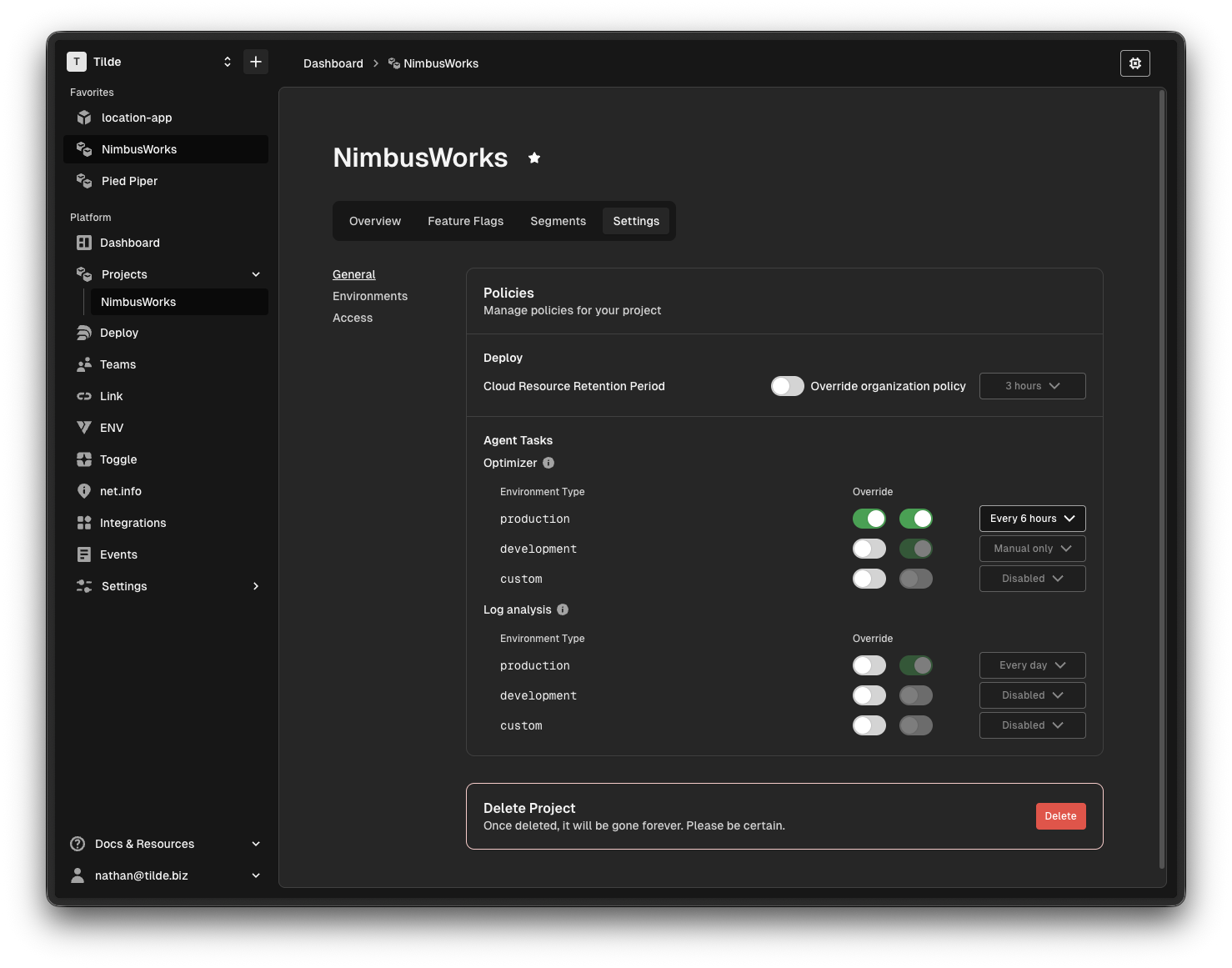
Agent policies can be set at the project environment level
New: Log Analysis Policy Controls
Log Analysis tasks let Hyphen Agent inspect deployment logs or connected APM data, identify likely issues, summarize what is going wrong, and connect findings to follow-up work.
For teams, that means less time manually digging through raw operational data and a faster path from incident symptoms to a concrete explanation and next step. With organization-level policy controls, Log Analysis can now be managed as recurring operational work instead of only as an ad hoc task.
By default, Log Analysis recurring policies follow this production-first baseline:
| Environment type | Default setting |
|---|---|
production | Enabled |
development | Disabled |
custom | Disabled |
New: Optimizer Policy Controls
Optimizer tasks let Hyphen Agent analyze runtime signals and current deployment settings, then recommend configuration changes such as resource sizing or scale adjustments for a project environment.
That gives customers a more practical way to reduce waste, improve reliability, and keep deployment settings aligned with how an environment is actually being used. This release also adds more flexible environment-layer overrides, so teams can tune recurring optimization behavior closer to each environment they manage while still starting from an organization-level policy baseline.
By default, Optimizer recurring policies follow this production-first baseline:
| Environment type | Default setting |
|---|---|
production | Enabled |
development | Disabled |
custom | Disabled |
This gives teams a sensible production-first baseline while still allowing lower-level overrides when a non-production environment needs recurring optimization work.
Deployment and App UX Follow-Ups
This release also ships several reliability and navigation improvements across deploy and app surfaces:
- Deployment run detail links now route through project environments, which keeps deployment investigation aligned with the environment that owns the run.
- Deployment and dashboard date handling is more stable, especially for queued states and relative time displays.
- Clipboard failures now surface as actual errors instead of always reporting a successful copy.
- Team access, link stats, toggle targets, charts, and related app views have more stable rendering behavior.
Things to Know
- Log Analysis recurring behavior still follows the effective Agent task policy for the relevant deployment target.
- Optimizer recommendations remain scoped to a project environment and still require approval for scale-related changes.
- Deployment investigation now flows more consistently through project environments views instead of splitting navigation across separate surfaces.