
Agent Log Analysis Pull Requests and Project/Link Tools
added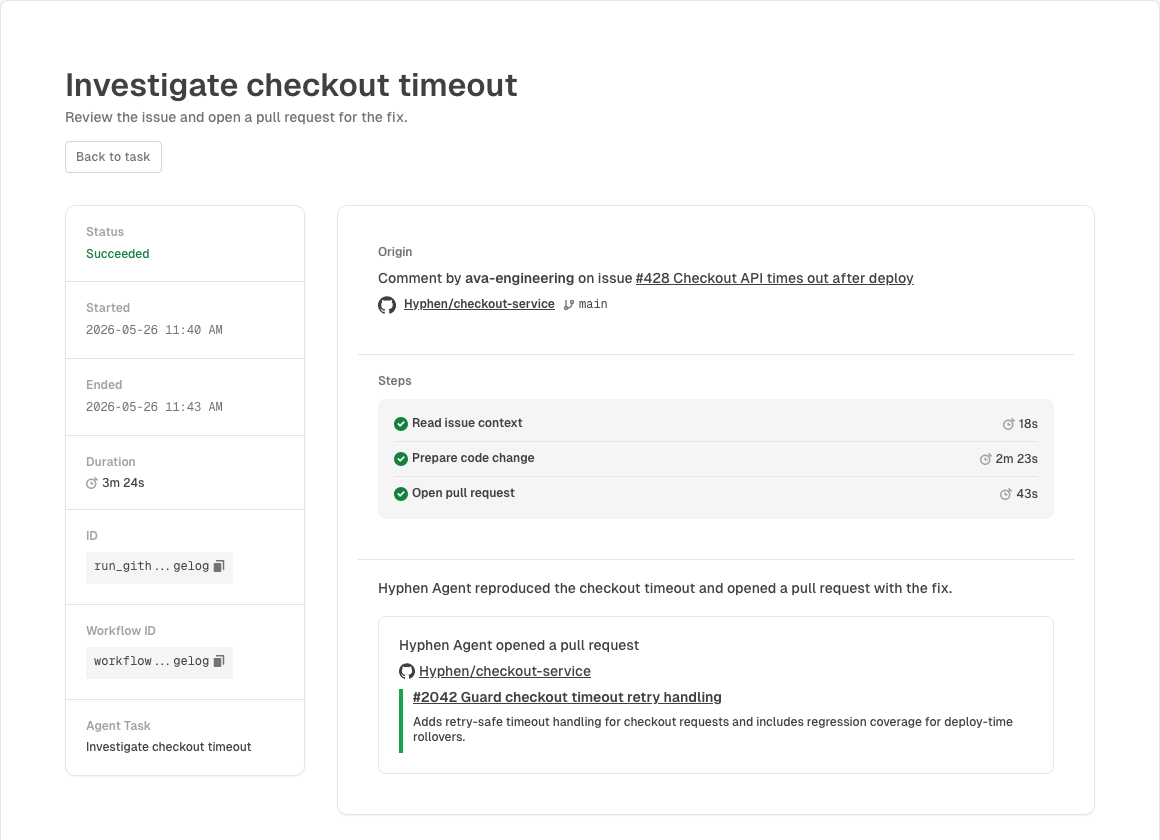
Hyphen Agent can now turn Log Analysis findings into code review. After Agent analyzes deployment logs and identifies an underlying issue, it can use a connected GitHub repository to open a pull request with a proposed fix. This release also adds project, short link, and QR code tools, safer structured action prompts, and live link updates in Hyphen.
Pull Requests from Log Analysis
Log Analysis no longer stops at surfacing findings. When Hyphen Agent finds an actionable issue in deployment logs, it can connect that finding to the relevant GitHub repository and open a pull request to fix the underlying cause.
Results appear in Agent task and run views with:
- The Log Analysis context that led to the proposed fix
- The repository and base branch Agent used
- Completed workflow steps with timing
- Pull request cards with open, closed, and merged states
- Links back to the repository, issue, and pull request
Project, Link, and QR Tools
You can now ask Hyphen Agent to work with projects, short links, and QR codes directly from chat.
- List projects — Show the projects in your organization or find the right project for follow-up work.
- Create projects — Create a new project after collecting the required details and confirmation.
- Read short links — Find or describe an existing short link.
- Create short links — Create a short link after collecting the required details and confirmation.
- Delete short links — Delete a short link after confirmation.
- Work with QR codes — Help with QR code creation, deletion, or retrieval for existing short links.
Short link and QR code changes emit live events, so the app reflects updates without requiring a manual refresh. Project references in Agent messages also link back to the right place in Hyphen.
Safer Agent Decisions and Navigation
Agent actions that need approval or more information now use structured input requests. Instead of replying in freeform chat, you can approve, reject, choose an option, or provide a specific text response in a focused prompt.
Agent messages also include better links back into Hyphen. Project references can now take you directly to project access settings, and deleted teams or short links show clearer alerts when you land on a resource that no longer exists.
Things to Know
- Log Analysis pull requests require GitHub. The affected app needs a connected GitHub repository before Agent can open a pull request.
- Agent opens reviewable changes. Fixes are proposed as pull requests, not applied directly to production code.
- Project creation requires project permissions. Agent follows the same organization access rules as the rest of Hyphen.
- Short link actions require a configured domain. You need the right organization permissions and a configured link domain.
- Mutations still require confirmation. Agent will not create, delete, or change resources without a confirmation step.
- Live updates require an active event connection. If the app loses its connection, refresh to pull the latest link or QR code state.
Under the Hood
- Log Analysis-to-PR context carries finding details into the GitHub automation run so reviewers can follow the path from detected issue to proposed fix.
- Structured input requests now power Agent confirmations and targeted follow-up questions.
- Project tools let Agent list existing projects and create new ones from chat.
- Link and QR lifecycle events keep short link state current in the app.
- Project access links now support direct navigation to project settings.